
 Doc Summary

Note: Now that Workflows are live in all accounts, you can do everything that Triggers and Campaigns do (and more!), all in one builder! #
Triggers are conditional statements (similar to Zaps in Zapier) that connect all the different modules of OneSystemCRM together. Think of triggers as the wiring or ‘secret sauce’ in the back-end, making all the cool things OneSystemCRM does actually happen.
Example:Let’s say you have set up a Zap in Zapier to push leads into a OneSystemCRM campaign when they fill out a form embedded in a ClickFunnels landing page. You also want to send an SMS notification to your client to let them know when this happens (the equivalent to letting them know they have a new lead)
How would we do this?
Answer: Set up a trigger!
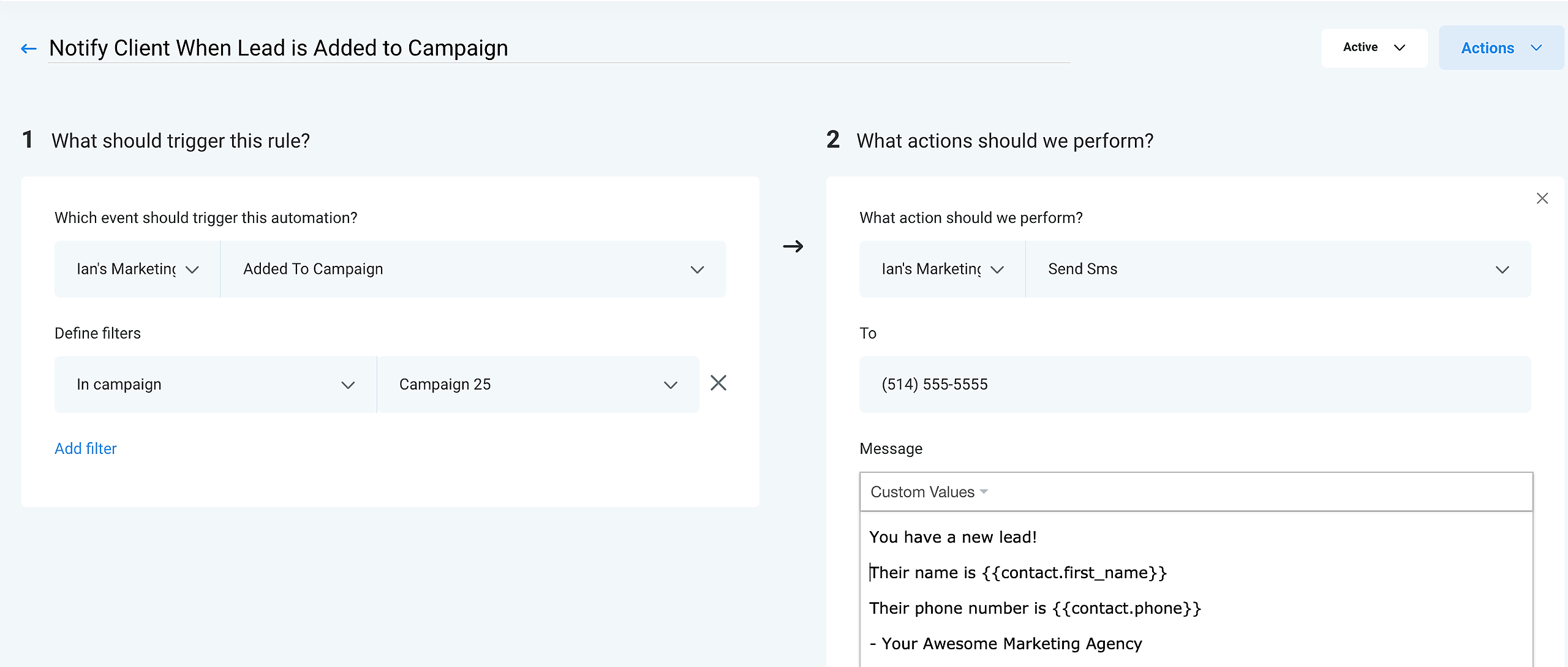
Create, Name and Activate Triggers
Follow the steps below to create, name and activate a trigger:
- Click Triggers
- Click + New Basic Rule
- Choose a trigger from the Choose a trigger dropdown and add all the necessary filters
- Click +Add action
- Choose an action from the Choose a action dropdown and all the necessary filters
- Name the Trigger in the Trigger name field
- Click the Draft dropdown and click Activate


